
Practical travel tool
Travel data calculator
Estimate travel data from assumed daily use, convert MB to GB, and follow a nine-day Japan example of 8.16 GB with separate daily and hotspot cap checks.
Best eSIM Tools
Build your estimate
Estimate travel data from assumed daily use, convert MB to GB, and follow a nine-day Japan example of 8.16 GB with separate daily and hotspot cap checks.
Model assumptions, reviewed October 19, 2026: video 12 MB/minute, maps 1.5 MB/minute, social use 4 MB/minute, background use 100 MB/day, and an optional 500 MB/day for hotspot. These are editable-planning defaults, not measured app or Japan averages. The estimate is trip days × daily MB ÷ 1,000 × 1.20, rounded up to an available allowance tier. The 20% is an illustrative planning allowance. The separate worked case below uses its own explicit daily inputs.
Build your estimate
A nine-day Japan eSIM example: 8.16 GB
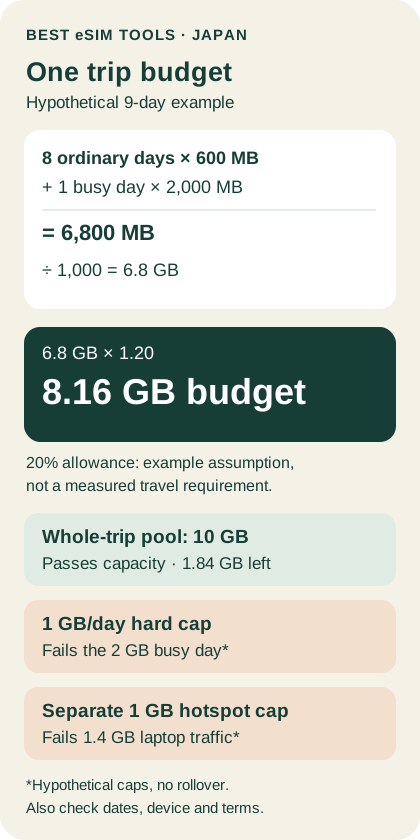
For this nine-day example, budget 8.16 GB, including the busiest day and an illustrative 20% planning allowance. The calculation is (8 ordinary days × 600 MB + 1 busy day × 2,000 MB) ÷ 1,000 × 1.20 = 8.16 GB. A 10 GB whole-trip pool passes this capacity check; a 5 GB pool does not. A 1 GB-per-day hard cap with no rollover cannot cover the 2 GB busy day. These are assumed inputs, not measured tourist usage or a recommendation that everyone needs 10 GB. Check the plan’s validity, network and hotspot terms before buying.
Convert MB to GB before choosing a plan
This guide uses decimal units: 1 GB = 1,000 MB. Divide MB by 1,000 to get GB. For example, 750 MB ÷ 1,000 = 0.75 GB. Binary units are different: 1 GiB = 1,024 MiB. Do not silently interchange GB and GiB; use the provider’s stated billing convention. NIST’s unit definitions explain the distinction.
If a plan says “500 MB per day for nine days,” the arithmetic is 500 × 9 = 4,500 MB, or 4.5 GB of nominal daily allowances. That does not turn it into a flexible 4.5 GB pool. Whether unused data carries forward depends on the actual terms.
Calculate one whole-trip budget, including the busiest day
Assume eight ordinary days with 420 MB of phone use and 180 MB of laptop use through the phone’s hotspot each day. On the ninth, busier day, assume 600 MB of phone use and 1,400 MB of hotspot use. Assume phone and hotspot traffic draw from the same data pool. These numbers are chosen to demonstrate the calculation; replace them with your own usage records.
- Add the ordinary day’s uses: 420 + 180 = 600 MB.
- Calculate eight ordinary days: 8 × 600 = 4,800 MB.
- Add the busy day’s uses: 600 + 1,400 = 2,000 MB.
- Add the whole trip: 4,800 + 2,000 = 6,800 MB.
- Convert to GB: 6,800 ÷ 1,000 = 6.8 GB.
- Apply the example’s 20% planning allowance: 6.8 × 1.20 = 8.16 GB.
The 20% is an editorial assumption for this worked example, not a measured safety requirement or a probability of running out.
Use 8.16 GB as this example’s buying budget throughout. If the available choices are a 5 GB pool and a 10 GB pool, the 5 GB option is short. The 10 GB option passes the capacity check. It still needs enough validity for all nine service days, support for your device and permission for the planned hotspot use.
Check whether a daily plan can cover the same trip
The 8.16 GB whole-trip budget does not remove the busy day’s separate requirement. A hypothetical 1 GB-per-day hard-cap plan with no rollover does not cover the 2 GB day, even though nine daily allowances add up to 9 GB. A pooled allowance and a daily cap are not interchangeable.
If the daily number is a high-speed threshold rather than a hard cap, read what happens afterward. Reduced-speed access is not the same as having enough full-speed allowance for that upload. Do not assume unused capacity from yesterday becomes available today.
Check hotspot rules separately
“Hotspot supported” answers whether tethering is permitted. It does not, by itself, establish a separate tethering allowance, the post-limit speed or whether every plan has identical conditions.
The busy day already includes 1,400 MB of laptop traffic: 1,400 ÷ 1,000 = 1.4 GB. If a candidate plan has a separate 1 GB daily hotspot cap, that laptop workload exceeds the cap by 400 MB, even if the phone’s allowance or whole-trip total looks sufficient. This is a hypothetical limit, not a rule attributed to a particular Japan provider.
Use this buying decision
First reject any plan that fails your device, service dates or intended hotspot use. Then compare the remaining plans against both numbers: your whole-trip budget and your busiest-day requirement.
For the example here, the trip budget is 8.16 GB with the chosen allowance, and the busiest day is 2 GB. A 10 GB pooled option passes the capacity calculation. A 1 GB-per-day hard-cap option without rollover fails the busy-day requirement. A separate 1 GB daily hotspot cap also fails the illustrated 1.4 GB laptop workload.
Only after those checks should price decide between otherwise suitable options. This is a capacity calculation, not a purchase or network test.
For this capacity example, a 10 GB whole-trip pool leaves 10 − 8.16 = 1.84 GB after the planned budget; that remaining amount is not a measured forecast of actual usage.
Questions about Japan eSIM data allowances
How many GB is 500 MB per day for nine days?
Using decimal units, 500 × 9 ÷ 1,000 = 4.5 GB. That is the sum of the daily allowances, not proof that all 4.5 GB can be used on one day.
Is 5 GB enough for nine days in Japan?
Not for this example. Its buying budget is 8.16 GB, calculated as (8 × 600 + 2,000) ÷ 1,000 × 1.20. A different usage pattern may need less; calculate from your own inputs.
Is 1 GB per day the same as a 9 GB plan?
No. A daily limit and a whole-trip pool have different timing constraints. A 2 GB day fails a 1 GB hard cap without rollover, even if other days use less.
Does hotspot support mean unlimited shared data?
No. Check permission, any separate hotspot allowance and what happens at the limit. Phone data and tethering data may have different conditions.
After sizing the allowance, compare Japan eSIM providers by network, hotspot and activation rules.
Check before buying
- Confirm the local network and exact coverage for your destination.
- Check hotspot limits, activation timing, and data expiry rules.
- Read refund terms before installing or activating the eSIM.
What works well
- Straightforward app-led setup and account management.
- Broad destination choice for single-country and regional trips.
- A useful alternative when comparing price, validity, and data size.
Best eSIM Tools