
Read the listing as four separate promises
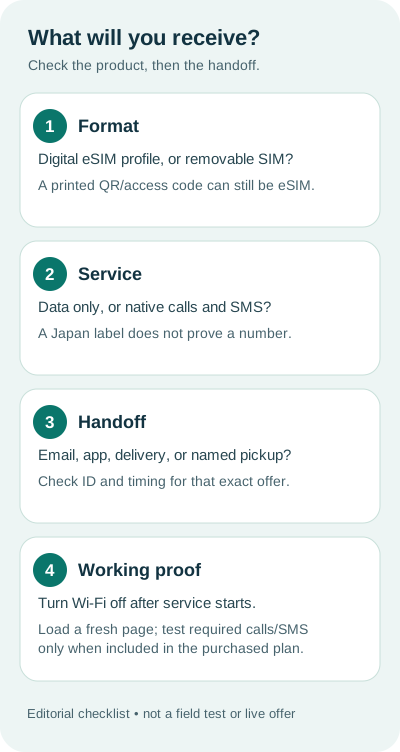
“eSIM card for Japan,” “Japan eSIM card,” and “Japan SIM card” can look like interchangeable product names in a listing. Treat them as search language, then inspect the offer itself. Its physical format, included service, delivery method and start condition can differ. Paying before those four fields are clear turns an easy purchase into a handoff problem.
| Field | What to verify | Why it changes the decision |
|---|---|---|
| Format | Digital eSIM profile or removable physical SIM; exact device support. | A printed QR code is not a chip. A phone without eSIM support needs another compatible arrangement. |
| Service | Data-only, native voice, SMS, Japanese number, hotspot and stated network or plan scope. | The word “Japan” proves none of these features individually. |
| Handoff | Email, app, postal delivery or a named collection point; any ID and timing steps. | An eSIM can still require a physical access-code pickup, while a removable SIM can be shipped. |
| Start | What begins validity and when service should work. | Purchase, profile installation and first connection are not necessarily the same event. |
Record the exact product URL and checkout date next to these fields. A provider home page is not enough to prove the terms of a particular variant. If the listing leaves a required field unstated, ask that provider before paying or keep another option on your shortlist.
A digital product can have a physical handoff
Apple's international eSIM guidance says a travel eSIM can be bought from a local carrier or worldwide provider and installed digitally, for example by QR code or app. For another carrier on an iPhone, Apple requires a compatible, unlocked device; an installation connection may also be needed. Its article does not promise that every Japanese offer is emailed or that every plan has a number.
Mobal's Japan eSIM page, checked October 9, illustrates why the delivery field matters. Mobal describes an eSIM with a Japanese number whose access code is posted or collected after its ID process. On the same site, it presents a data-only eSIM with email delivery and a separate removable SIM product. These are one provider's current product paths, not a rule for all sellers or a recommendation of its prices.
When a listing says “card,” ask which of these objects changes hands:
- Activation details: a QR or manual code, perhaps printed, that installs a digital profile on a supported phone.
- Removable SIM: a chip to insert into a compatible, unlocked phone with a usable SIM tray.
- Router: a separate Wi-Fi device and possibly a rental return; this is a different connection arrangement.
A printed eSIM code solves neither a missing eSIM chip nor a carrier lock. A removable SIM does not automatically bring a Japanese voice number. If the required service is a local number, inspect the plan's native calls and SMS, identity, activation and overseas-use rules separately. The Japan eSIM plan comparison handles data-plan selection; the general format guide explains the wider eSIM-versus-SIM tradeoff.
Plan the handoff before the arrival day
Use the route that can be completed with the phone and time you actually have. A digital order before departure may avoid a collection stop, but only if the exact provider allows early installation and the validity clock is understood. A pickup can suit a traveler wanting staff help, but only if that specific counter, hours, stock, identity process and setup assistance are confirmed. Shipping a removable SIM can move the task home; verify its arrival date and the phone's tray and unlock status.
| Purchase path | Before relying on it | At handoff |
|---|---|---|
| Digital delivery | Confirm compatible unlocked device, delivery channel, expiry or activation rule and installation instructions. | Save the provider's code and support route securely; install only by the provider's supported steps. |
| Physical access-code pickup for eSIM | Confirm the exact collection point, date, hours, required ID and whether setup help is included. | Check that the item is an eSIM access code, not a removable SIM, before leaving. |
| Removable SIM purchase or pickup | Confirm tray, format, unlock status, inventory or delivery and included service. | Keep the packaging and activation details; ask whether staff will actually install and test it. |
Before checkout, keep a small evidence note: product name and variant; number of travelers and devices; delivery or collection plan; first and last required data day; required data, calls, SMS and sharing; stated refund and support path; final checkout total. Blank fields remain unresolved rather than becoming a guessed “yes.” This worksheet is our editorial tool, not a purchase test or a claim that a vendor will honor undocumented features.
Prove a required task after service starts
At the supported start event, select the new line for mobile data and turn Wi-Fi off. Load a fresh page or route that matters to your trip. A signal icon or an installed profile alone is weaker evidence than a completed task. If the purchased plan explicitly includes native calls or SMS, test the required function by the provider's instructions; a messaging app over data is not the same service. Keep the receipt, package identifier and support path until the trip is over.
For the actual installation controls, use the provider's instructions and our eSIM setup guide. For a family that separates, first compare the independent-service and shared-device arrangements in our Japan pocket Wi-Fi versus eSIM guide.
A traveler asked whether airport physical SIMs still make sense
In a Japan Guide forum question posted January 18, 2026, a parent planning a 25-day family trip asked whether a physical SIM could still be bought at Narita, after finding prior in-person installation easier than an eSIM. The family also expected to split up, so one shared router did not meet its plan. This is a real purchase and setup question, not evidence of today's stock, opening hours, price or law.
The practical answer is to identify a named seller and exact product before arrival, then verify its current counter or pickup details, whether staff installation is offered, required ID, the phone's SIM format and unlock status, and what service is included. If those items cannot be confirmed, keep a separately workable route such as an eligible pre-delivered product. Forum replies describe individual experiences and disagree on voice-number eligibility; they are not authoritative terms for a current purchase.
Japan eSIM card questions
Is a Japan eSIM card a physical card?
Usually no: an eSIM is a digital cellular profile. A seller may print its QR or access code on a card, but that paper is not a removable SIM. Confirm the exact listing's format before paying.
Can I buy a physical SIM at Narita instead?
The January 2026 Japan Guide question describes that preference, but forum replies do not prove today's counter inventory or hours. Check a named airport or provider's current pickup location, product, opening hours, ID requirements and assistance before relying on arrival purchase.
Does a Japan eSIM card include a Japanese phone number?
The format does not decide that. Many travel offers are data-only; a native number, calls and SMS must be explicit in the exact product. Check any ID, access-code and activation requirements for a number plan.
If an eSIM code comes by post, do I install a physical SIM?
No. A printed access code may activate a digital eSIM. Mobal currently describes that delivery method for its Japanese-number eSIM; its physical SIM is a separate product. Follow the exact provider's instructions.
Should I install a Japan eSIM before flying?
Only when the exact provider permits early installation and you know what starts validity. A compatible unlocked device and an installation connection are also needed. Check the plan rule, then use the provider's instructions.
How do I know the purchased Japan SIM works?
After the plan's start condition is met, select its data line, turn Wi-Fi off and load a fresh page. Test native calls or SMS only if the exact plan includes them; keep the receipt and support route if a required task fails.
Sources and limits
Apple and Mobal's linked first-party pages were checked October 9, 2026. Apple establishes iPhone requirements and general eSIM purchase routes; Mobal establishes only its own current product examples. The January forum post supplies the traveler's question, not a current airport inventory check. We have not bought or tested these products, compared live checkout totals, measured Japanese networks, or verified a particular counter's stock. Recheck the exact offer at purchase.
The format-service-handoff-start worksheet, arrival record and graphic are independently developed editorial tools. They do not replace the provider's terms or the phone manufacturer's compatibility record.