China travel eSIM: installation timing

Can You Install a Travel eSIM in China? The iPhone Rule Before Arrival

If you use an iPhone, Apple's China guidance says an eSIM from a carrier outside mainland China cannot be installed while the phone is physically in mainland China. Plan the installation step before crossing, but first check the exact package's validity trigger: Airalo says most plans start when they connect in their coverage area, while some begin at installation. This is an Apple-specific rule about installation—not a statement about Android, every device, or whether a plan will connect.

Location checkApple: outside mainland China
Clock checkRead the exact plan trigger
ScopeiPhone guidance, not Android advice

The short answer

Separate where you can install from when the plan starts

“Will my eSIM work in China?” can mean two different things: whether the profile can be installed at your current location, and when the provider's paid service period begins. Apple's mainland-China iPhone page says non-mainland carrier eSIMs can't be installed while located in mainland China. The provider separately decides whether a particular package starts at installation, first connection, or another event.

That creates a practical order: confirm the exact iPhone and plan, read the activation policy before touching the install flow, then schedule any required installation while outside mainland China. Do not infer that “install before travel” means every plan's clock waits until arrival.
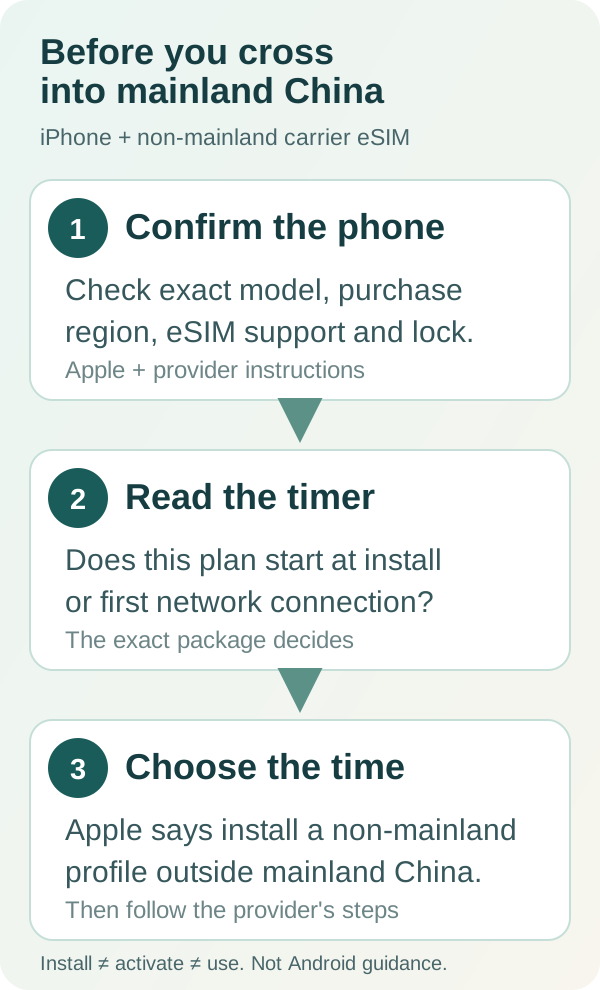
Three-step China travel eSIM check: confirm the exact iPhone model and provider, read whether the exact plan validity begins at installation or first network connection, and complete any non-mainland carrier eSIM installation while outside mainland China according to Apple guidance
Original editorial checklist. Apple's location statement is about iPhone installation; a provider's package rules determine when its validity begins.

Step 1 · device and carrier

Check the exact iPhone model, region and lock status

Do not use only the family name printed on the phone. Apple recommends identifying the iPhone by its model number; regional versions can have different SIM capabilities. Check the model in Settings → General → About, then verify eSIM support and carrier-lock status with Apple and the provider for the exact offer.

Airalo's iOS compatibility guidance also warns that eSIM availability can vary by model and region and tells users to check whether the iPhone is carrier locked. Its checklist is provider guidance, not a universal approval for every travel eSIM. If your model or lock status is uncertain, pause and ask the device maker or carrier before purchase.

Step 2 · exact package

Find the validity trigger before installation

“Validity” is the provider's service window, not a universal phone setting. Open the exact package details and look for the event that starts it.

What the written trigger means for your installation plan
Wording on the exact planWhat it meansPractical next check
Validity begins at first connection in the coverage areaThe profile may be installed ahead of use without that wording itself starting the plan. Airalo says this is the most common trigger for its eSIMs, not a rule for every provider.Confirm the package says this, then follow its installation instructions while you have reliable internet and remain outside mainland China.
Validity begins at installationThe paid days can begin before you reach the destination. Installing early may consume part of the package period.Ask the provider about the exact package and timing. If its instructions require pre-entry installation, choose timing with that cost in mind; don't wait until inside mainland China on the assumption an iPhone can install it there.
Trigger is unclear or not shownDo not assume purchase, installation, line-on, and first data use are the same event.Save the package page and ask the provider to state the exact trigger in writing before installing.

Source boundary: Airalo's public policy, checked October 21, says most of its plans begin validity when they connect to a supported network in the coverage area, while some begin as soon as installation occurs. We have not checked out, installed or tested a plan, and Airalo's policy must not be generalized to another seller.

Step 3 · where to install

For an iPhone, handle a non-mainland travel eSIM before entering mainland China

Apple's support page says that eSIMs from non-China-mainland carriers can't be installed while an iPhone is located in mainland China. That makes location part of the setup checklist, even when the plan itself is intended for travel there. Follow the exact provider's allowed setup path while outside mainland China; keep its activation instructions and support route available.

This statement is about installing a profile. It does not, by itself, prove that a plan has working coverage, that the device is unlocked, that data starts immediately, or that turning on the line is safe under your provider's terms. Once the profile is already present, use the provider's instructions for selecting the travel line, data roaming and connection after arrival.

If you're already in mainland China without the profile installed, contact the eSIM provider and Apple or your device maker for a supported option. Do not delete an existing profile or repeatedly retry setup based on a forum post; first confirm whether the exact device and package have a supported recovery path.

A different product

Mainland carrier eSIM activation is a separate route

Apple's same page describes eSIM support for China mainland carrier service as a different path: only listed iPhone models support it, and activation requires a visit to a carrier store with an identity check. Apple names China Mobile, China Telecom and China Unicom on that page. A foreign travel eSIM is not the same product as a domestic carrier eSIM, and the local activation rules should not be used to describe every travel plan.

Apple's page was published September 9, 2026 and checked again for this article on October 21, 2026. At that check, it listed iPhone 18 Pro (A3715), iPhone 18 Pro Max (A3718), iPhone Duo (A3721), iPhone 17e (A3635), and iPhone Air (A3518) as supporting eSIM in mainland China. Recheck Apple's live list before relying on it; this model list is specifically about mainland-China eSIM service, not a compatibility promise for a travel provider's plan.

Official references

Sources checked for this guide

These sources were reviewed on October 21, 2026. Apple's page controls the Apple-specific location and domestic-carrier statements. Airalo's pages describe Airalo's own plan and device guidance; they do not establish another provider's policy. Best eSIM Tools did not field-test a device, install a profile, or complete a purchase.

FAQ

China eSIM installation questions

Can I install a travel eSIM after I arrive in mainland China?

For iPhone, Apple says eSIMs from non-China-mainland carriers cannot be installed while the phone is located in mainland China. That is an Apple-specific installation statement; check the exact device and provider instructions, and do not assume it describes Android phones.

Should I install my China travel eSIM before departure?

If you use an iPhone and a non-mainland carrier eSIM, plan for installation while outside mainland China, following the provider's instructions. Before installing, check whether that exact plan starts validity at installation or when it first connects in its coverage area.

Does an eSIM plan start counting days when I install it?

It depends on the exact plan. Airalo says most plans start validity when they connect to a supported network in the coverage area, while some start at installation. Other providers may use different rules, so read the selected package's policy.

Is a mainland China carrier eSIM the same as a travel eSIM?

No. Apple's mainland-China eSIM page discusses supported iPhone models and in-person carrier-store activation with an ID check for mainland carrier service. That is a different product and activation route from a non-mainland travel eSIM.